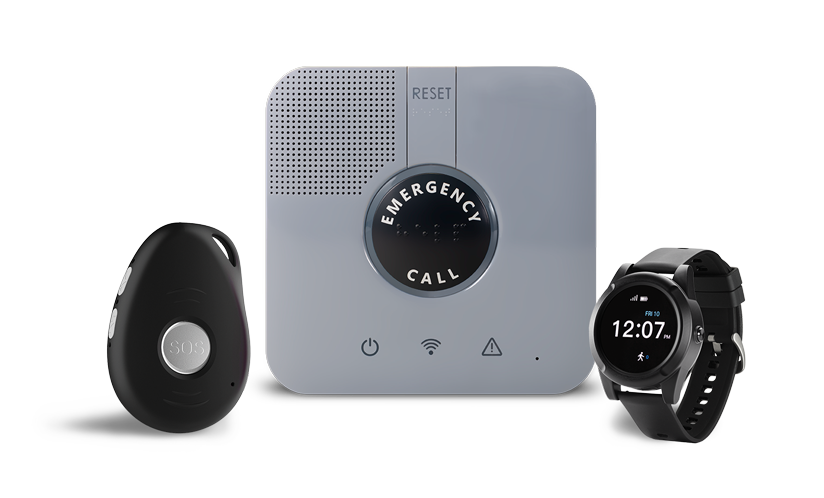
A fall can happen quickly, and in the moments afterward, it may not be possible to reach a phone or press an emergency button. Fall detection devices are designed to recognize signs of a fall automatically and connect the user to help, even when they cannot call on their own.
Most fall detection devices use built-in sensors to track sudden movement, impact, and changes in body position. When the device identifies a pattern that may indicate a fall, it sends an alert to a 24/7 monitoring center or emergency contact, depending on the system. From there, a trained specialist can speak with the user, assess the situation, and send help if needed.
For seniors who live alone, family caregivers, and anyone at greater risk of falling, automatic fall detection can add an important layer of protection. It does not replace fall prevention or medical care, but it can help reduce the time between a fall and a response.
How Fall Detection Devices Work
Fall detection devices work by looking for movement patterns that are different from ordinary daily activity. Walking, sitting down, bending over, reaching for an item, or lying down usually create predictable motion patterns. A fall tends to create a different pattern: a sudden drop, quick acceleration, impact, and a change in position.
When a device detects that kind of pattern, it can automatically start the emergency alert process. With a monitored system, the alert connects the user to a response center where a specialist can speak through the device. This matters because after a fall, a person may feel disoriented, be in pain, or be unable to press a button.
LifeStation’s medical alert fall detection is designed to support that moment with automatic detection, two-way communication, and 24/7 monitoring.
What Sensors Do Fall Detection Devices Use?
Automatic fall detection depends on several types of sensors working together. Each sensor looks at a different part of movement, and the system uses that information to decide whether a fall may have happened.
Accelerometers
Accelerometers measure changes in speed and direction. If the device suddenly moves downward or changes direction with force, the accelerometer can help identify the motion as unusual.
Gyroscopes
Gyroscopes measure orientation and rotation. They help the device understand whether the wearer has shifted from an upright position to an unusual angle or lying position.
Barometric Sensors
Barometric sensors measure changes in air pressure. This can help the device recognize a change in height, such as moving from standing to the floor. Barometric data can be especially useful when combined with motion data.
Algorithms
The device’s software analyzes sensor data in real time. The goal is to identify likely falls while filtering out normal movement, such as sitting down quickly, dropping the device, or bending over. This balance matters because a device should respond quickly to real emergencies without creating constant false alarms.

What Happens After a Fall Is Detected?
When a monitored fall detection device senses a possible fall, it sends an alert through the medical alert system. The device may use cellular service, GPS, WiFi, or a connected in-home base unit, depending on the model.
With LifeStation, the user is connected to a trained care specialist. LifeStation’s average response time is below 15 seconds, helping users reach a real person quickly when every moment feels important. The specialist will try to speak with the user through the device’s two-way communication system, ask what happened, and determine what help is needed.
If the user says they need help, cannot respond, or the situation sounds urgent, the specialist can contact emergency services or the user’s designated emergency contacts. This is one of the most important differences between a basic device and a professionally monitored medical alert system.
Get help today and shop more medical alert systems from LifeStation, so you can find the device that is best fit to your lifestyle.
How Accurate Is Automatic Fall Detection?
Automatic fall detection can provide meaningful added protection, but no fall detection device detects 100% of falls. Some falls may not create enough motion, impact, or position change for the device to recognize them. Other movements, such as sitting down quickly or dropping the device, may occasionally trigger an alert.
That is why fall detection should be treated as an added safety layer, not a guarantee. If a user is able to press the help button during an emergency, they should always press it. The button remains the most direct way to request assistance.
A good fall detection system should be sensitive enough to detect serious falls, but smart enough to reduce unnecessary alerts. For many families, that balance is what makes automatic fall detection worth considering: it adds protection for moments when pressing a button may not be possible.
Who Should Consider a Fall Detection Device?
A fall detection device may be helpful for older adults who live alone, spend time alone during the day, have balance concerns, use mobility aids, manage chronic conditions, or have had a previous fall. It can also be useful for caregivers who want reassurance that a loved one has a way to reach help even when they are not nearby.
Falls are a major concern for older adults. CDC data shows that falls are the leading cause of injury for adults ages 65 and older, and more than 14 million older adults report falling each year. A medical alert system cannot prevent every fall, but it can help make sure a fall does not go unnoticed for too long.
Families comparing options may also want to review how to choose a fall detection system for seniors based on lifestyle, mobility, comfort, and monitoring needs.
In-Home vs. Mobile Fall Detection Devices
The best fall detection device depends on where the person spends time and how they prefer to wear or carry the device. Some people mainly need protection at home. Others want coverage while walking, shopping, visiting family, or traveling.
In-home fall detection
An in-home system is often a good fit for someone who spends most of their time around the house. LifeStation’s in-home medical alert system is designed for reliable access to help at home, including areas where falls are more common, such as bathrooms, kitchens, bedrooms, and stairs.
Mobile fall detection with GPS
A mobile device can be a better fit for active seniors who leave home regularly. Mobile systems with GPS can help identify the user’s location if help is needed away from home. This can be especially reassuring for caregivers who worry about a loved one walking alone, running errands, or traveling.
Smartwatch-style options
Some users prefer a watch-style device because it feels familiar and easy to wear. A smartwatch-style medical alert option can support active routines while offering emergency response features in a device that looks less like a traditional pendant.
How Much Do Fall Detection Devices Cost?
Cost is one of the first questions many families ask, and it is a fair one. A fall detection device should fit both the user’s safety needs and the household budget.
As of April 2026, LifeStation pricing is:
- Sidekick Home: $38.95
- Sidekick Smart: $42.95
- Pearl: $42.95
Pricing and plan details can change, so users should confirm the current rate before ordering. Some shoppers may also qualify for discounts, benefits, or other affordability options depending on their situation. For budget-sensitive households, LifeStation’s guide to financial assistance for medical alert systems can be a useful next step.
Questions to Ask Before Choosing a Fall Detection Device
Before choosing a device, it helps to compare the features that matter most in a real emergency. The right device should be easy to wear, easy to use, and supported by dependable monitoring.
- Does the device include 24/7 professional monitoring?
- How quickly does the monitoring center usually respond?
- Can the user speak through the device?
- Does the device work at home, outside the home, or both?
- Does it include GPS or location support?
- Is the device water-resistant or waterproof for bathroom use?
- How often does it need to be charged?
- Is fall detection included or optional?
- Can caregivers check in or receive useful location information?
- What is the monthly cost, and are there any long-term contracts?
For a broader buying framework, readers can review LifeStation’s guide on how to choose a medical alert system.
Fall Detection and Peace of Mind for Families
The value of fall detection is not only the technology inside the device. It is the reassurance that someone is available when help is needed. For older adults, that can support more confidence at home and on the go. For caregivers, it can reduce the constant worry that a loved one might fall and be unable to call.
LifeStation combines automatic fall detection options with 24/7 monitoring, two-way communication, GPS-enabled mobile protection, and a 30-day money-back guarantee. The goal is simple: help older adults stay independent while giving families a dependable way to stay connected to support.
Talk with a LifeStation specialist to compare fall detection options and find the right fit for your routine.
FAQs About Fall Detection Medical Alert Devices
Do fall detection devices call 911 automatically?
It depends on the system. With a professionally monitored medical alert system, the device usually contacts a monitoring center first. A trained specialist can speak with the user, assess the situation, and contact emergency services if needed.
Can fall detection devices detect every fall?
No. Fall detection does not detect 100% of falls. It can add valuable protection, but users should always press their help button if they are able and need assistance.
Do fall detection devices work outside the home?
Some do. Mobile medical alert systems with cellular service and GPS can support users outside the home. In-home systems are usually designed for household coverage, while mobile devices are better for active users who want protection on the go.
Are fall detection devices worth it for seniors?
For many seniors and caregivers, fall detection is worth considering because it can automatically request help when the user cannot press a button. It may be especially helpful for people who live alone, have balance concerns, or have a history of falls.
What should caregivers look for in a fall detection device?
Caregivers should look for reliable monitoring, two-way communication, comfortable wearability, GPS support if the user leaves home, water resistance or waterproofing, clear pricing, and a device the older adult is willing to wear consistently.
Conclusion
Fall detection devices use sensors, software, and emergency communication tools to identify possible falls and connect users to help. They are not perfect, and they do not replace pressing the help button when possible, but they can provide an added layer of protection when someone is unable to call for help on their own.
For seniors who want to stay independent and families who want greater peace of mind, a LifeStation medical alert system with fall detection can make daily life feel safer, more connected, and more supported.